
Conditional logic & required fields
Make forms adapt to the answer — show the right fields and enforce the ones that matter.
Control each field
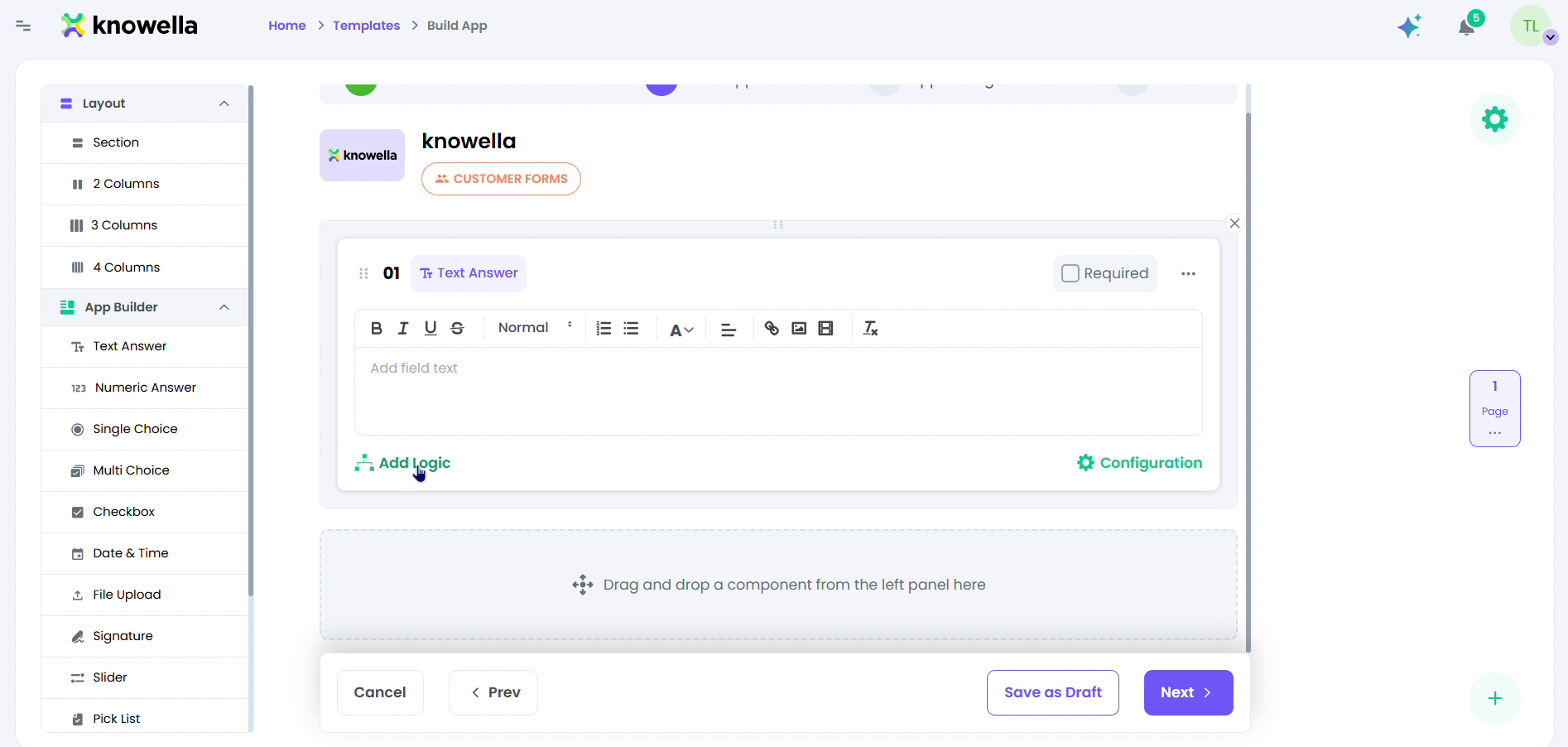
The screen shows a component selected on the Build App canvas with its controls exposed. Two do the heavy lifting: the Required toggle, which blocks submission until the field is answered, and Add Logic, which ties this field's visibility to an earlier answer. Configuration holds the finer rules — validation, default values, formatting. Together they turn a static form into one that adapts to each response and enforces the answers that matter.
- Required — Block submission until the field is filled in.
- Add Logic — Show/hide or branch a field based on a previous answer.
- Configuration — Set validation rules, default values, and formatting.
Show the right fields at the right time
With Add Logic a field appears only when a previous answer calls for it — ask about a corrective action only when a check fails, for instance. People get a short, relevant form instead of wading through fields that do not apply to them.
Enforce what cannot be missing
Marking a field required blocks submission until it is answered, so critical data — a signature, a severity rating, a photo — is never left blank. It is the simplest guardrail against incomplete records.
Ready to build your own?
Start free and ship your first app in minutes — or have us set it up with you.
More guides in Workflows & Forms
More resources